

New GA4 Updates and Features (Last 2 Months July 2025)
Lead Reporting - new GA4 features
The new lead reports in GA4 can be found in the Business Objective set of standard reports and also the Lead Acquisition in the Lifecycle set.
These automated reporting tools rely on the implementation of recommended events, therefore there is some work to do for these metrics to populate.
I have based this implementation on the standard ecommerce events, as these are essentially configured in the same manner – requiring some custom ‘push to data layer’ code and event listeners in GTM along with the tags and triggers to send to GA4.
How GA4’s eCommerce Events Map to a Typical Lead/Sales Funnel
You can also find a YouTube video on other GA4 Updates.
Here’s a table showing standard GA4 eCommerce events, how they map to a typical checkout journey such as WooCommerce journey, and how you might piggyback custom “lead” events alongside them:
| Funnel Stage | GA4 eCommerce Event | Trigger Point in Website | Custom Lead Event (Optional) |
|---|---|---|---|
| Viewing a product | view_item | On single product page load | – |
| Adding to cart | add_to_cart | On add to cart action | qualified_lead |
| Viewing cart | view_cart | On cart page load | – |
| Beginning checkout | begin_checkout | On checkout page load | – |
| Entering payment details | add_payment_info | On payment step | – |
| Submitting order | purchase | On successful order / thank-you page | close_convert_lead, qualified_lead |
| Creating account | sign_up (optional GA4) | If user signs up before or during order | qualified_lead |
| Requesting a quote | – (custom) | Via quote form or “Book Consult” form | form_submit, qualified_lead, generate_lead |
Funnel Parameters
| GA4 / Custom Event | When to Trigger | Required Parameters |
|---|---|---|
view_item | Product detail page load | items array with item_id, item_name |
add_to_cart | Add to cart action | items, value, currency |
remove_from_cart | Item removed from cart | Same as add_to_cart |
view_cart | Cart page load | items, value, currency |
begin_checkout | Checkout page load | items, value, currency |
add_payment_info | Entering payment method | items, payment_type, etc. |
purchase | After successful checkout | transaction_id, items, value, currency |
sign_up | User signs up or registers | method (e.g., 'email') |
qualified_lead | User shows meaningful interest (form, sign-up, etc.) | lead_type, lead_source, lead_id (recommended for attribution) |
generate_lead | User submits marketing form / chat / newsletter | lead_source, method, lead_id |
close_convert_lead | Lead successfully converts (e.g., purchase) | lead_id, conversion_value, currency (if applicable) |
close_unconvert_lead | Lead goes cold or lost | lead_id, unconvert_lead_reason (e.g., 'no_response') |
disqualify_lead | Lead is not a fit (not qualified) | lead_id, disqualified_lead_reason (e.g., 'budget', 'industry');/;, |
The above table should provide you with distinct tracking advantages and advanced funnel analysis data. GA4 will automatically pick up and populate this data in these new reports – and also has pre-built audience templates to allow significant targeting advantages to your paid campaigns – across all channels.
You can still add custom events and parameters to the above actions or perhaps you have a T&Cs or deposit process in your sales funnel – this particularly well suited to the conversion, qualify and disqualify lead journeys and data reporting process.
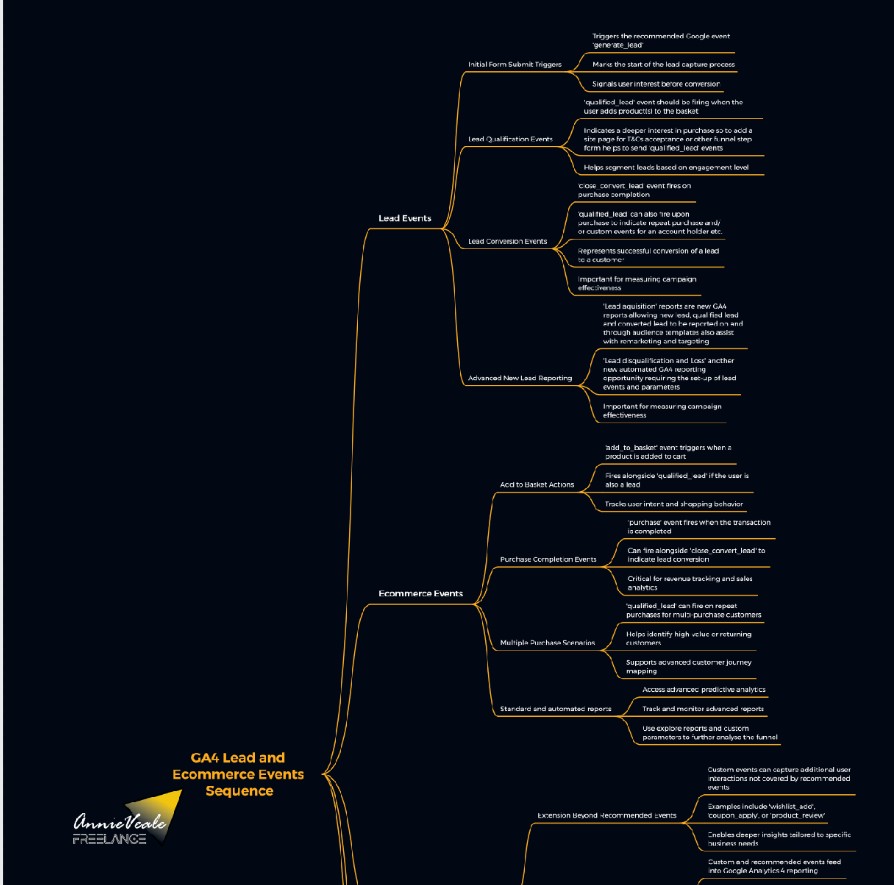
Logic Chart for Lead and Ecommerce Events and reporting

CONSENT SETTINGS
Also in the admin panel is the data collection settings and the new data consent settings, this panel has a number of acknowledgement and privacy settings that you need to update – if you haven’t already!
There is also a new advanced setting for ads personalisation, which is essential for anyone relying on audiences or data for GAds. It would be worth checking on these as well as the Google Tag Gateway in the GTM admin panel – this will likely need connecting up to cloudflare to allow the GCM V2 to work correctly along side your configuration of your CMP banner.
